Posts

Showing posts with the label EPiServer CMS

How your site appears in google search results

Image
Search engines now look deep into site contents and try to understand more about your site e.g. Google uses structure data to understand more about the content on your page. By providing structured data we not only can get the benefit of special features like rich snippets but also our site will be eligible to appear in graphic search results. By providing structured data you can outstand your site presence in the google search results and in result increase in clickthrough. While searching keyword 'eCommerce' (from the UK, 5th of May 2020) I get the following results. These are the highlights of the page Featured snippet Related Images Article Books People also searched for FAQ and the rest of the search results. Google supports structured data in the following formats  JSON-LD  (recommended, use this format whenever possible),  Microdata , and  RDFa . Google also uses  schema.org vocabulary, but for definitive, google search behaviors, r...

EPiServer CMS 11 Useful SQL Queries - 2

Here is a set of few queries that we have been using in different investigations Get usages of EPiServer contents including pages and blocks Check Table size No contents have been added for following content types Looking into Activity Logs Unmapped Property List Get usages of EPiServer contents including pages and blocks SELECT   tct.Name,    tct.ModelType,    COUNT(tc.pkID) AS PageCount FROM   tblContent AS tc RIGHT OUTER JOIN   tblContentType AS tct ON tc.fkContentTypeID = tct.pkID Where tct.ModelType is not null and tct.ModelType not like 'EPiServer.%' GROUP BY   tct.Name, tct.ModelType ORDER BY  PageCount desc Check table size EXEC sp_spaceused 'tblBigTable' No contents have been added for following content types SELECT   tct.Name,    tct.ModelType FROM   tblContent AS tc RIGHT OUTER JOIN   tblContentType AS tct ON tc.fkContentTypeID = tct.pkID Where tct.ModelType is not null a...

EPiServer CMS 11 Useful SQL Queries - 1

Here is a set of few queries that we have been using in different investigations Check How Big is your Database Get Data for Each Property and from Each Content Type Complete Tree Structure of your web site Check EPiServer DB Version Check How Big is Database SELECT      t.NAME AS TableName,     s.Name AS SchemaName,     p.rows AS RowCounts,     SUM(a.total_pages) * 8 AS TotalSpaceKB,      CAST(ROUND(((SUM(a.total_pages) * 8) / 1024.00), 2) AS NUMERIC(36, 2)) AS TotalSpaceMB,     SUM(a.used_pages) * 8 AS UsedSpaceKB,      CAST(ROUND(((SUM(a.used_pages) * 8) / 1024.00), 2) AS NUMERIC(36, 2)) AS UsedSpaceMB,      (SUM(a.total_pages) - SUM(a.used_pages)) * 8 AS UnusedSpaceKB,     CAST(ROUND(((SUM(a.total_pages) - SUM(a.used_pages)) * 8) / 1024.00, 2) AS NUMERIC(36, 2)) AS UnusedSpaceMB FROM      sys.tables t INNER JOIN       ...

Get Specific Elements Blocks from EPiServer Forms

A small extension to get the specific form elements block with all properties rather relying on   FriendlyNameInfo  with the limited set of properties. EPi Form Extensions Gist Example: Custom form element block: public   class   HiddenExternalValueElementBlock  :  HiddenElementBlockBase {     [ Display (Name =  "Enable if its a special campaign" )]      public   virtual   bool  MySpecialCampaign {  get ;  set ; }     [ Display (Name =  "Propperty 1" )]      public   virtual   bool  Property1 {  get ;  set ; }     [ Display (Name =  "Property 2" )]      public   virtual   bool  Property2 {  get ;  set ; } } Extension Methods: using  EPiServer.Core; using  EPiServer.F...

Azure based architecture for serving EPiServer CMS As Content Hub

Image
This architecture uses the Azure API Management to provide access to content from EPiServer for different channels. Contents are exposed via headless API and other Custom written APIs. Editors and admins will have secure access to EPIServer CMS. API Management is used to publish APIs to external, partner and channels, securely and at scale. Application Insights is used to detect issues, diagnose crashes and track usages. AAD - Azure Active Directory is used for secure, enterprise-grade authentication. Traffic Manager is used to determining which web app is geographically best placed to handle each request, and will be used to obtain zero downtime.  A CDN - content delivery network serves static content, such as images, script, and CSS for different channels. Azure SQL DB/Redis Cache/Azure Blob Storage to server data about the site in a high performance and highly scalable way References: Episerver headless white paper Cont...

Serialize IContent to use in Angular like front technologies

(A self note) A generic service to convert IContent into an Expando Object , ExpandoObject  can be converted into JSON to use in Angular/React components. Find the code gist  https://gist.github.com/khurramkhang/e8d4b9ef093fe30610be986efa352744 Limitations: not supporting multilingual not preparing friendly urls

Few best practises while working with orders

Validate the status of line item (at required stage in sale flow) to make sure the product is active, within the valid date range, and that the catalog entry is available in the current market. Validate the status of line item (at required stage in sale flow) to make sure business does not lose money. It is important to add coupons to the IOrderForm before running apply discounts(cart.ApplyDiscount method) Avoid saving carts unnecessarily and repeatedly. You should avoid casting back and forth between concrete Order classes (OrderGroup, OrderForm, etc.) and the new abstraction interfaces (IOrderGroup, IOrderForm, etc.). For example, from the time you load the cart or purchase order until you save it, only use one API. While this is not always possible, doing it whenever possible helps avoid hidden problems when casting. Do not use Math.Round() for rounding. The following methods return a value with the correct number of decimals, which is determined by the input currency. - C...

Schedule Jobs revised

Schedule jobs has been revised in version 10.8. we have a new property Restartable on the ScheduledPlugIn attribute, that can be defined as following [ScheduledPlugIn(Restartable = true)] Jobs having property "Restartable=true" will make sure it can be re-run to completion in case of crashes before next schedule time. There are few considerations for developers before using this. The job should also be implemented in such a way that it can be started repeatedly.  If the job processes data, it should be able to continue where it was aborted.  It is also recommended to implement a stoppable job, but be aware that the Stop method will only be called for controlled shutdowns which can be picked up by ASP.NET, and not for uncontrolled shutdowns such as an IIS crash or other external changes. In the unlikely event the job is repeatedly cancelled, or the job it

How CDN can effect personalisation

Image
Without going into detailed benefits of CDN, generally CDNs are used to deliver the contents from fastest and closest available server.  In Episerver Digital Experience Cloud services, CDN has its own URL pointing to the original URL. The visitor will navigate to something like "www.customer.com". The request will go to the CDN, which in turn goes to the origin URL for non-cached data. The request will return to the CDN, which will cache the content.   Personalisation based on Geolocation will be effected as IP detection services will receive edge server’s IP. In a CDN setup, requests to the web server often come from an edge server and not from the actual client; therefore the HttpContext.Request.UserHostAddress property reflects the edge server's IP address rather than the connecting client's. This can be corrected by configuring the header with true IP.  Add following settings in AppSettings key="episerver:ClientIPAddressHeader" value=...

How to render SVG in edit mode

Self note: SVG is a smart media format that enables us to use same image in different sizes without compromising on quality and performance. EPiServer supports SVGs but images will not display in editor mode while using the IMG tag, as media urls are updated with version details. e.g. "globalassets/160-835st_bilok_2_screw_straight8mm_x_35mm.svg" will change as  "/episerver/CMS/Content/globalassets/en/160-835st_bilok_2_screw_straight8mm_x_35mm.svg,,1823?epieditmode=False&visitorgroupsByID=undefined". EpiServer will resolve urls for media in this way in Edit and Preview mode. In result svg will not be shown in editor mode. To display the SVG in edit mode, we will be required to resolve url in Default mode, this can be done by calling an overload of the GetUrl-method of the UrlResolver: UrlResolver.Current.GetUrl(svgContent, language, new VirtualPathArguments () { ContextMode = ContextMode.Default })

Walk through KPI

A key performance indicator (KPI) records when a visitor on a website performs a desired action, such as clicking on an add button, or runs a piece of java script. A custom KPIs can be creating by implementing IKPI interface, to use in Episerver A/B testing or in any other package that relies on creating instance-based goal objects. An example Implementation can be found on GIST Helpful links: http://world.episerver.com/documentation/developer-guides/CMS/key-performance-indicators-kpis/ https://www.david-tec.com/2016/11/creating-a-custom-conversion-goal-with-episerver-ab-testing/

POC custom pricing provider works

In most ecommerce websites, prices comes from some third system and we import the prices into EPiServer Commerce along with products and variants data, but this is not the case all the time. In some scenarios pricing are quite complex and have to decide at run time or require to retrieve from some web services. A custom pricing provider can be built to support these kind of scenarios. we are require to implement IPriceService for read only prices and IPriceDetailService for Editing prices. We will be require to register these service in structure map e.g. services.AddSingleton< IPriceService, CustomPriceService >(); Find the POC on GIST

Custom Price Placed Processor

We need to implement IPlacedPriceProcessor interface to get the currently-placed price for an line item if business have additional pricing rules outside of what is implemented in out of the box pricing provider. Here is an example implementation. We wre required to inject custom classes at startup via structuremap.

Useful Nuget commands

Having the little knowledge of Nuget Commands is important if your company is thinking to adopt EPiServer Continuous Release Process. In Visual Studio Click  Tools>Nuget Package Manager>Package Manage Settings, Select from Options, Package manager>Package Sources. Click + Button and add an entry with Name: EpiServer packages Source: http://nuget.episerver.com/feed/packages.svc/ After these setting you are ready to use EPiserver Nugets. Nuget Packages can be installed from 'Package manager Console' or 'Manage Nuget Packages For Solution' window. Here are few useful nuget commands To extract the SQL schema Changes Find the full article ( http://robertlinde.se/post/episerver-sql-scripts-and-continuous-integration-with-octopus-deploy ) Export-EPiUpdates To update database after upgrade update-epidatabase In order to see the list of available versions of an episerver package you can use a command like this Get-Package -ListAvailable -Filter EpiSe...

Error handling in IIs 7

Image
Not a new topic but I come across a situation when our offshore team was not able to see the error details. This is reminder if someone forgets that. In IIS 7.0 The <httpErrors> element allows you to configure custom error messages for your Web site or application. <CustomErrors> won't work. Click for further details on httperrors httpError Elements EPiServer Error handling Example Production Enviornment Settings <httpErrors errorMode="Custom" existingResponse="Replace">       <error statusCode="404" path="/Page404.html" responseMode="ExecuteURL"/>       <error statusCode="500" path="/500-error-page.html" responseMode="ExecuteURL"/> </httpErrors> Developers Environment Settings: With Settings <httpErrors errorMode=" Custom " existingResponse=" Replace "></httpErrors> Error Details on screen will be like this Wi...

Blocks for EPiServer Commerce Catalog Nodes

Can we use Blocks with Catalog nodes? In theory Yes, what can stop you. We had a requirement when CMS editor can add a Carousel Block to Catalog Nodes. But Block Gadget was not available in CMS Catalog Edit Mode. Only available gadgets were Catalog, Media, Latest and Versions. From architecture point of view I was convinced that we can add ContentArea for Catalog Nodes and Blocks can be reused for Catalog Nodes also. I googled the issue and find an answer by Linus. Its simple I want to keep solution as a self note. Add the following section under your <episerver.shell> section in web.config and the blocks gadget should appear for the commerce view (given that you have not customized your view):<viewManager> <views> <add name="/episerver/commerce/catalog"> <settings> <add name="AddSharedBlocks" transformationType="Add" definitionName="EPiServer.Cms.Shell.UI.Components.SharedBlocksComponent" plugInA...

Upgrade from CMS 6R2 to EPiServer 7 CMS and from EPiServer Community 4.1 to EPiServer Community 7

Image
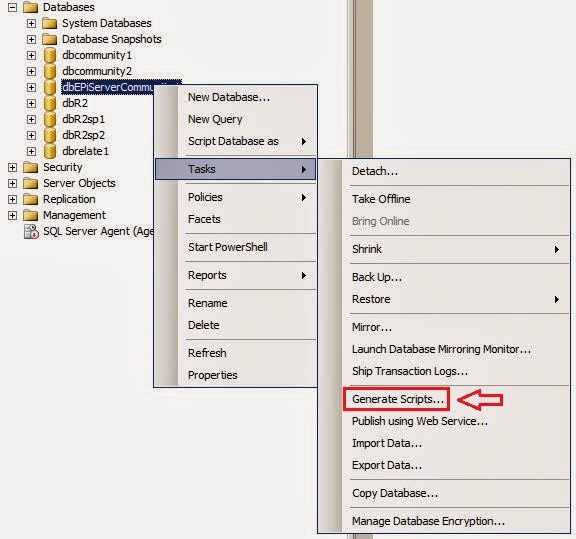
There is a requirement before upgrading a Community site with separate databases (CMS6r2 and Community 4.1) to EPiServer 7 and Community 7 is to merge the Community database with the CMS database. This is an instruction of how to accomplish this in MS SQL Server 2008 R2. 1. Startup In the SSMS, right-click the Community database that shall be merged with the CMS database and generate a script. 2. Choose Objects Select  “Select specific database objects” and then select Tables, Views, Stored Procedures and User-Defined Functions but not all objects within those boxes.  Objects to choose: Tables tblEPiServerCommon* tblEPiServerCommunity* Views vwEPiServerCommon* vwEPiServerCommunity* Stored Procedures spEPiServerCommon* spEPiServerCommunity* User-Defined Functions fnEPiServerCommon* fnEPiServerCommunity* 3. Set Scripting Options Save the script to a specific location and save to a single file. Then press the “Advance...

Working with Markets in EPiServer Commerce 7.5

It is a very strong feature of EPiServer Commerce 7.5 being an Enterprise Commerce Platform combined with the power of all CMS features. It can help businesses to grow and target correct markets and earn more profits. The "Market" means that you can define multiple markets, each with its own product catalog, language, currency, and promotions, for a single-site. It can be any type of division of Business, e.g. For a Business there can be more than one markets within the same country, language or a currency or another business may divide its markets at country level. E.g. A Book Seller Company may be selling different type of books in different parts of countries and they may require two different sites/markets or a car seller company selling cars in different countries Implementing markets You can define your own markets by implementing the IMarket interface, and set up a list of supported languages (through CultureInfo), countries in that market, supported curren...

CMS Style rendering Templates in EPiServer Commerce 7.5

1.        Create a Content Type We can use CMS-style rendering template in EPiServer Commerce 7.5. to use rendering template for a Node or an Entry, we need to define a content type class e.g. using EPiServer.Commerce.Catalog.ContentTypes; using EPiServer.Commerce.Catalog.DataAnnotations; using EPiServer.DataAnnotations; namespace EPiServer.Commerce.XYZ {     [ContentType]     public class FashionItemContent : VariationContent     {         [Encrypted]         [CultureSpecific]         public virtual string Description { get ; set ; }         [SaveHistory]         public virtual int Size { get ; set ; }     } } 2.        Define templates It i...