Posts

Showing posts with the label EPiServer CMS 7

Error handling in IIs 7

Image
Not a new topic but I come across a situation when our offshore team was not able to see the error details. This is reminder if someone forgets that. In IIS 7.0 The <httpErrors> element allows you to configure custom error messages for your Web site or application. <CustomErrors> won't work. Click for further details on httperrors httpError Elements EPiServer Error handling Example Production Enviornment Settings <httpErrors errorMode="Custom" existingResponse="Replace">       <error statusCode="404" path="/Page404.html" responseMode="ExecuteURL"/>       <error statusCode="500" path="/500-error-page.html" responseMode="ExecuteURL"/> </httpErrors> Developers Environment Settings: With Settings <httpErrors errorMode=" Custom " existingResponse=" Replace "></httpErrors> Error Details on screen will be like this Wi...
Upgrade from CMS 6R2 to EPiServer 7 CMS and from EPiServer Community 4.1 to EPiServer Community 7

Image
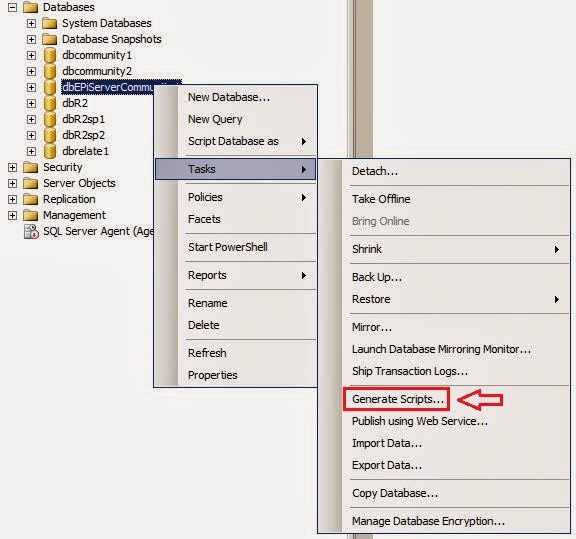
There is a requirement before upgrading a Community site with separate databases (CMS6r2 and Community 4.1) to EPiServer 7 and Community 7 is to merge the Community database with the CMS database. This is an instruction of how to accomplish this in MS SQL Server 2008 R2. 1. Startup In the SSMS, right-click the Community database that shall be merged with the CMS database and generate a script. 2. Choose Objects Select  “Select specific database objects” and then select Tables, Views, Stored Procedures and User-Defined Functions but not all objects within those boxes.  Objects to choose: Tables tblEPiServerCommon* tblEPiServerCommunity* Views vwEPiServerCommon* vwEPiServerCommunity* Stored Procedures spEPiServerCommon* spEPiServerCommunity* User-Defined Functions fnEPiServerCommon* fnEPiServerCommunity* 3. Set Scripting Options Save the script to a specific location and save to a single file. Then press the “Advance...